NHTSA Campaign Number: 17V142
Manufacturer Hyundai Motor America
Components TIRES
Potential Number of Units Affected 190
Incorrect Tire Pressure Sensor Mode/FMVSS 138
An underinflated inflated tire can increase the risk of a crash.
Summary
Hyundai Motor America (Hyundai) is recalling certain 2017 Santa Fe Sport vehicles.
The affected vehicles have a tire pressure monitoring system (TPMS) that may not have been set in the correct mode during vehicle assembly, and therefore will not provide an appropriate warning in the event of an underinflated tire.
As such, these vehicles fail to comply with the requirements of Federal Motor Vehicle Safety Standard (FMVSS) number 138, “Tire Pressure Monitoring Systems.”
Remedy
Hyundai will notify owners, and dealers will replace the TPMS sensors, free of charge.
The recall is expected to being March 31, 2017.
Owners may contact Hyundai customer service at 1-800-633-5151.
Hyundai’s number for the recall is 159.
Notes
Owners may also contact the National Highway Traffic Safety Administration Vehicle Safety Hotline at 1-888-327-4236 (TTY 1-800-424-9153), or go to www.safercar.gov.
Check if your Hyundai has a Recall
Important Recall Information
Date: March 03, 2017
Attn: Dealer Principal/General Manager/Service Manager/Parts Manager
Subject: Recall 159: 2017 Santa Fe Sport TPMS Sensor (TSB #17-01-017)
***IMPORTANT Dealer Stock and Retail Vehicles***
As required by federal law, dealers must not deliver new vehicles for sale or for lease to customers until all open recalls have been performed. Dealers must also perform all open recalls on used vehicles, demo and rental vehicles prior to placing them into customer use and whenever an affected vehicle is in the shop for any maintenance or repair.
Affected Vehicles
Hyundai has launched a recall to inspect and if necessary replace the Tire Pressure Monitoring System (TPMS) sensors on certain model year 2017 Santa Fe Sport vehicles manufactured February 01, 2016 to November 15, 2016.
Less than 1% of the 2017 Santa Fe Sport vehicles in dealer inventory as of the date of this notification are affected by this recall.
Reason for this Recall
The TPMS sensors may be in the incorrect mode and may not be functioning properly, which would illuminate the TPMS lamp on the gauge cluster.
Parts
- If the TPMS sensor(s) are found to be in the incorrect mode, replacement of the sensor(s) is required. Parts can be ordered through the normal parts ordering process in WebDCS. Refer to the Technical Service Bulletin (TSB) #17-01-017 for parts details.
Service Action
- The Technical Service Bulletin (TSB) #17-01-017 was published 02/17/17, and describes the service procedure to inspect and if necessary replace the TPMS sensors.
- Affected VINs are posted on WebDCS> Service Tab> Uncompleted Campaign VIN Listing – Dealer Stock and Retailed. Dealers may use owner information provided for the purpose of conducting and performing this recall campaign, and for no other purpose.
Customer Notification
Hyundai will notify all owners of the vehicles described above to return their vehicles to their Hyundai dealers for inspection or repair. Customer notification letters of the recall are scheduled to be mailed in late March 2017.
Thank you for your prompt attention to this important safety matter and continued commitment to taking care of Hyundai customers.
Hyundai Motor America
Important Recall Information
| Key Contact Information | ||
| Dealer Support | Contact Information | Description |
| Techline | 1‐800‐325‐6604 | Vehicle Technical Support for Hyundai Dealer Technicians |
| Warranty HELPREP Line | 1‐877‐446‐2922 | Warranty Claim questions for Hyundai Dealers |
| Warranty Prior Approval (PA) Center | 1‐844-371-3808 | Warranty Prior Approval (PA) Center for Hyundai Dealers |
| Xtime Technical Support | [email protected] 1‐866‐984‐6355 | Assistance with Car Care Scheduling:
• Appointment / Shop Capacity Management / Campaign Integration / Operation Codes |
| Customer Support | Contact Information | Description |
| Hyundai Customer Care Center (Recall / Campaign Questions) | 1‐855‐671‐3059 | Customer questions or concerns related to recall or service campaigns |
| Hyundai Recall / Campaign Website | www.hyundaiusa.com/campaign159 | Updated information related to the specific recall or service campaign |
| Hyundai Customer Care Center (General Questions) | 1‐800‐633‐5151 | Customers general questions, non‐campaign related |
| Hyundai Roadside Assistance | 1-800-243-7766 | Hyundai Roadside Assistance |
| Key Reference Information | |
| Name | Source |
| Car Care Scheduling (Xtime) – Tutorials | www.HyundaiDealer.com > Service > Dealer Resources > Documents Library > Car Care Scheduling |
| Car Care Scheduling (Xtime) – Recall Appointment Notification | 1. Log into Xtime
2. Under the menu at the top left, select ‘CONFIGURE’ 3. Under the dealership tab, click “EMAIL COMMUNICATION” 4. Slide the toggle to “ADVANCED” 5. Populate as many e-mails as desired in the “PARTS DESK EMAIL FIELD” |
| Campaign Central | Consolidated repository of recall and service campaign info. Located on the service homepage in www.HyundaiDealer.com |
| Parts – Campaign Parts Management (CPM) Procedure | As applicable; www.HyundaiDealer.com > Parts > Documents Library > Campaign Parts Management |
| Service Rental Car (SRC) Program | www.HyundaiDealer.com > Service tab |
| Technical Service Bulletin (TSB) | www.HyundaiDealer.com > Service tab > Hyundai Tech Info |
| Uncompleted Campaign VIN Listing | A listing of vehicles is located on WEBDCS> SERVICE tab> select
UNCOMPLETED CAMPAIGN VIN LISTING – Dealer Stock and Retailed. |
| Recall Campaign Website | www.hyundaiusa.com/recall www.hyundaiusa.com/campaign159 |
| NHTSA Website | www.safercar.gov |
| Technical Service Bulletin | GROUP RECALL | NUMBER 17-01-017 |
| DATE MARCH 2017 | MODEL(S) Santa Fe Sport (AN) | |
| SUBJECT: SANTA FE SPORT (AN) TPMS SENSOR INSPECTION AND REPAIR (RECALL CAMPAIGN 159) | ||
| IMPORTANT
*** Dealer Stock and Retail Vehicles *** Dealers must perform this Recall Campaign on all affected vehicles prior to customer retail delivery and whenever an affected vehicle is in the shop for any maintenance or repair. When a vehicle arrives at the service department, access Hyundai |
Description: Certain 2017MY Santa Fe Sport (AN) vehicles may have been shipped with the Tire Pressure Monitoring System (TPMS) sensor(s) in the incorrect mode, and may not comply with Federal Motor Vehicle Safety Standards. If a sensor is in the incorrect mode, the TPMS indicator lamp in the instrument cluster will illuminate. An improperly inflated tire may increase the risk of a crash. If the TPMS sensors are found to be in the incorrect mode, replacement of the sensors is required. This bulletin describes the service procedure to inspect and, if necessary, replace the TPMS wheel sensor(s).
| Applicable Vehicles:
Certain 2017MY Santa Fe Sport (AN) vehicles produced from 2/1/2016 through 11/15/2016. |
Parts Information:
| PART NAME | PART NUMBER | FIGURE | REMARK |
|---|---|---|---|
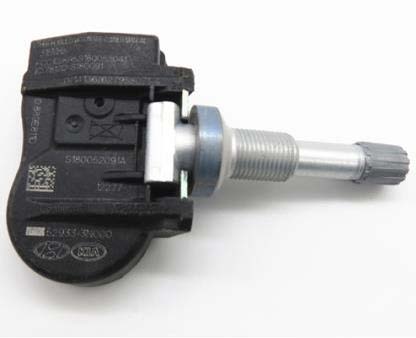
| TPMS Wheel Sensor | 52933-3N000 | 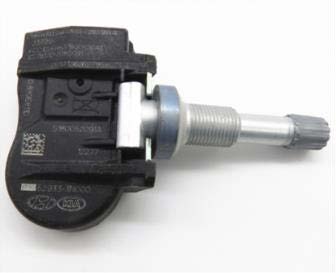 | Use a new nut when replacing the wheel sensor. |
| TPMS Wheel Sensor Nut | 52934-A5000 | 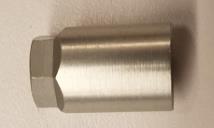 | Use a new nut when replacing the wheel sensor. |
Warranty Information:
| Model | Op Code | Operation | Op. Time | Causal Part | Nature Code | Cause Code |
|---|---|---|---|---|---|---|
| Santa Fe Sport (AN) | 71CG02R0 | TPMS Sensor Inspection | 0.3 M/H | 52933-3N000 | I3B | ZZ1 |
| 71CG02R1 | TPMS Sensor Inspection and Replacement (1 sensor) | 0.7 M/H | ||||
| 71CG02R2 | TPMS Sensor Inspection and Replacement (2 sensors) | 0.9 M/H | ||||
| 71CG02R3 | TPMS Sensor Inspection and Replacement (3 sensors) | 1.1 M/H | ||||
| 71CG02R4 | TPMS Sensor Inspection and Replacement (4 sensors) | 1.3 M/H |
NOTE 1: Submit Claim on Campaign Claim Entry Screen.
Service Procedure: TPMS Sensor Inspection Using GDS
| NOTICE
This Service Procedure is performed using PC-based GDS, or GDS-mobile. For update information and general precautions, please refer to TSBs #15-GI-001 and #15-GI-002. Please ensure the TPMS tool firmware is up to date. GDS procedures shown in this TSB are on GDS Mobile. For questions on PC-based GDS procedures, please call the GIT Helpline at 888-437-0308. |
GDS Mobile Procedure
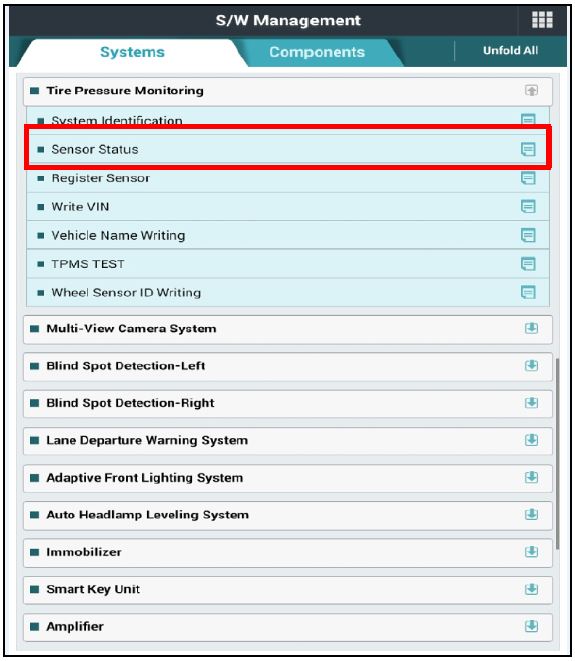
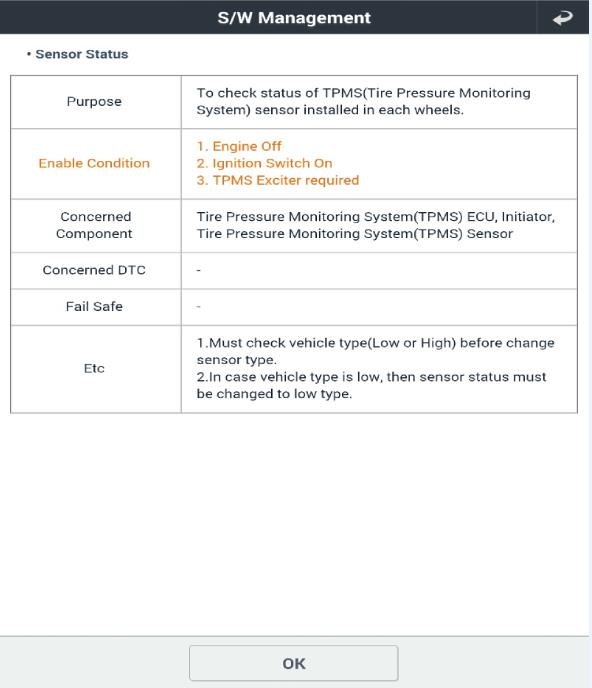
- From the S/W Management screen under Tire Pressure Monitoring, select “Sensor Status.”
- Read the function summary then click OK.
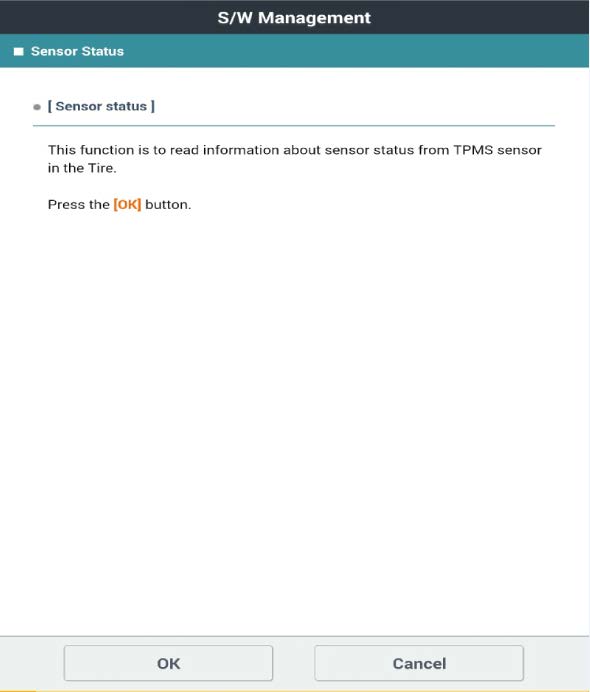
- Read the function description, then click OK.
- Read the service procedure instructions. When ready, place the TPMS tool close to the vehicle’s front left TPMS sensor (no need to press the button on TPMS tool), then select OK on GDS.
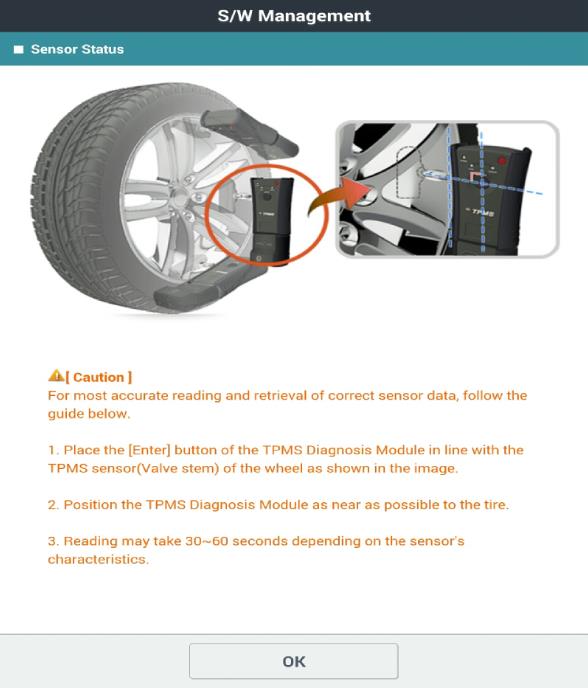
- After the first sensor is read, move to the next sensor (front right). Place the TPMS tool close to the wheel sensor and press the button on the TPMS tool.
- Continue onto the right rear, then left rear sensors, repeating the sensor reading as described in step 5.
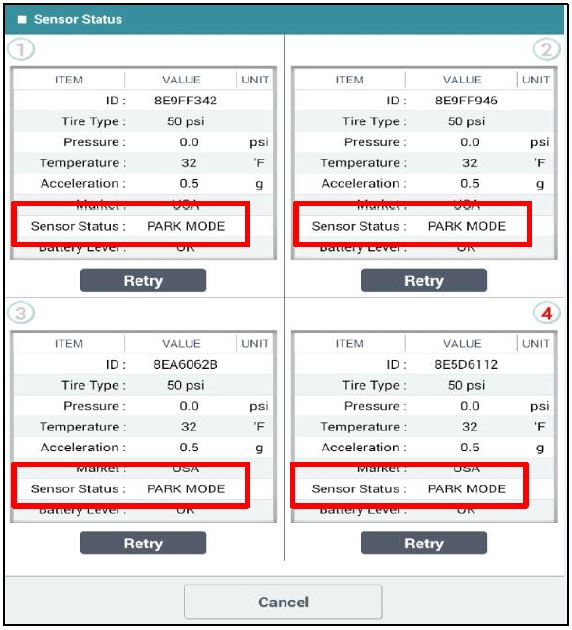
- After completing all sensors, the GDS will display information from all 4 sensors. Check the Sensor Status value:
- If all 4 sensors show “PARK MODE” or “DRIVE MODE,” no further service is required. Use labor op 71CG02R0.
- If any of the sensors show “SHIP MODE,” that sensor (or sensors) must be replaced. Continue to the Service Procedure: TPMS Wheel Sensor Replacement.
Service Procedure: TPMS Wheel Sensor Replacement
| NOTICE
Exact procedures for accessing TPMS wheel sensor may vary, depending on the type of tire changer used. Service procedures in this TSB are based on a Hunter Auto34 tire changer. |
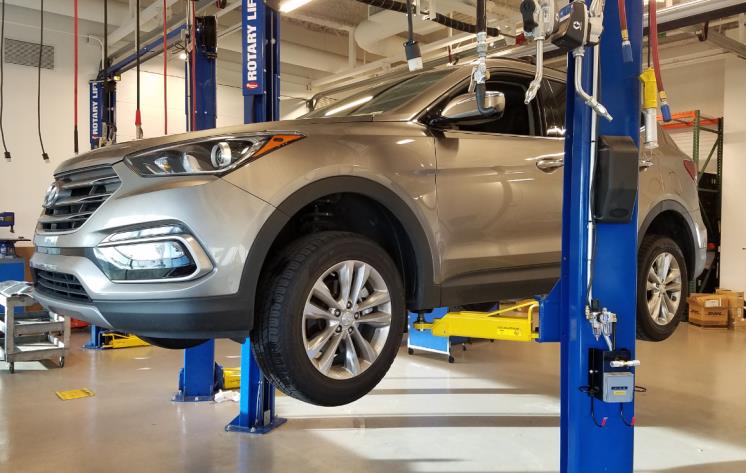
- Lift the vehicle on a hoist and remove the wheel(s) with TPMS sensors in “SHIP MODE.”
Tightening torque:
65.1~79.6 lb-ft (88.3~107.9 N.m, 9.0~11.0 kgf.m)
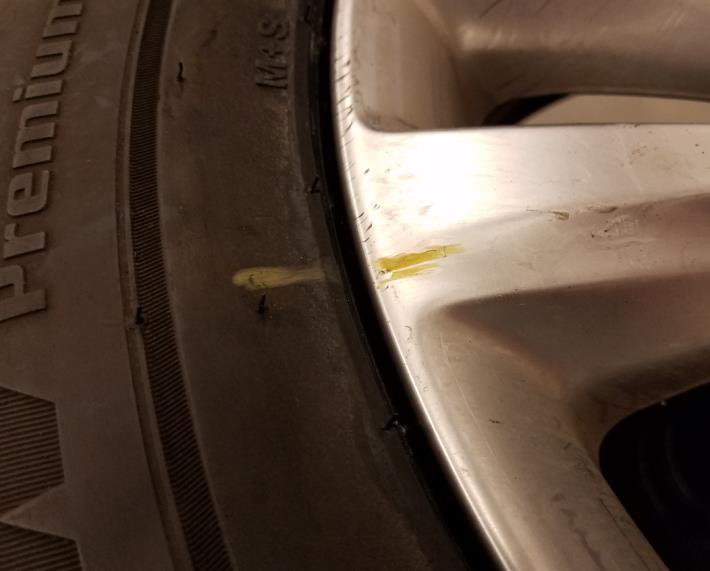
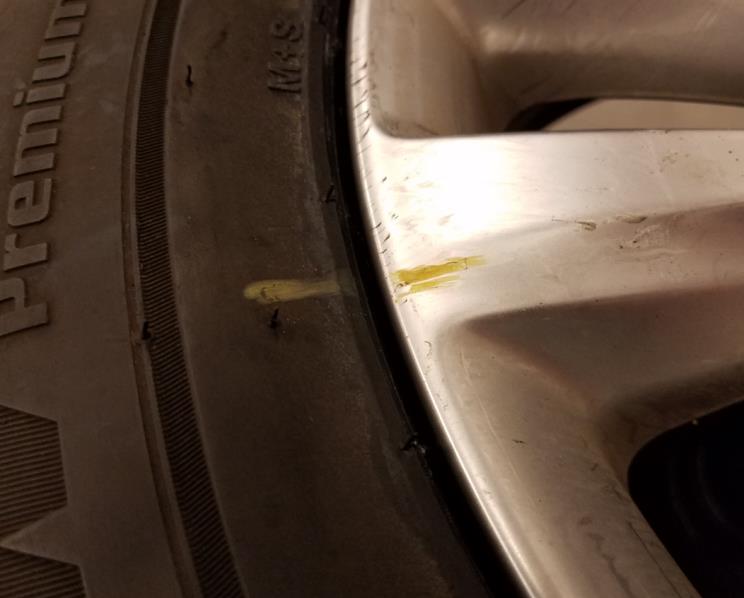
- Use tire chalk to mark the tire and rim’s relative position. Use this mark later to ensure the tire and rim did not change positions.
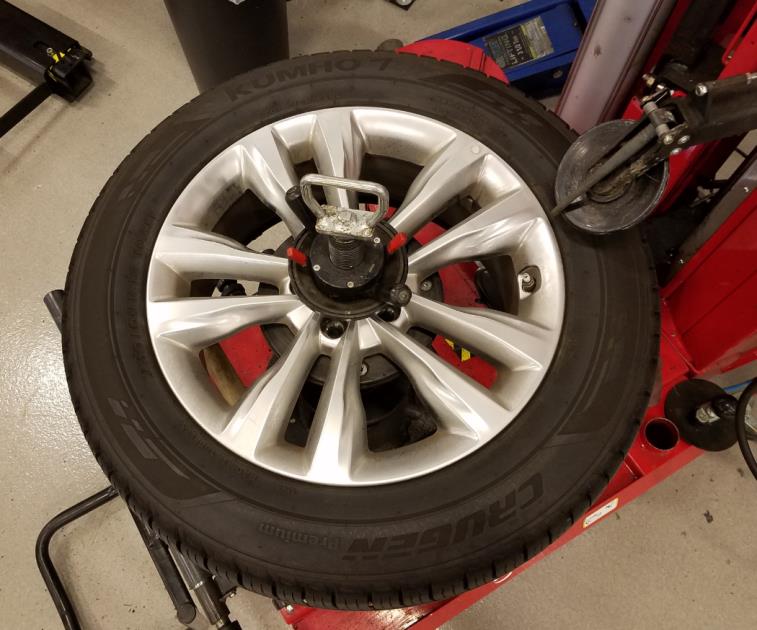
- Mount the wheel onto the tire changing machine. Remove the valve core to release the air inside the tire. Position the tire dismounting head ~10 degrees counterclockwise from the valve stem, as shown.
- Depress the head to release the tire’s upper bead slightly. Rotate the wheel/tire assembly counterclockwise one full rotation to fully release the upper bead. End the rotation with the tool positioned in about the same place as the start.
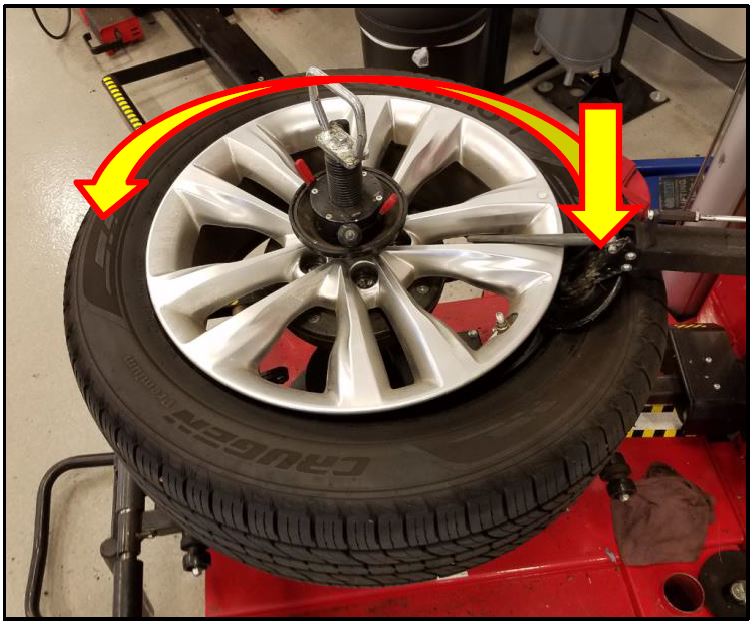
- Position the tire depressor on the opposite side of the dismounting head, then press down slightly on the tire to create more space to access the TPMS wheel sensor.
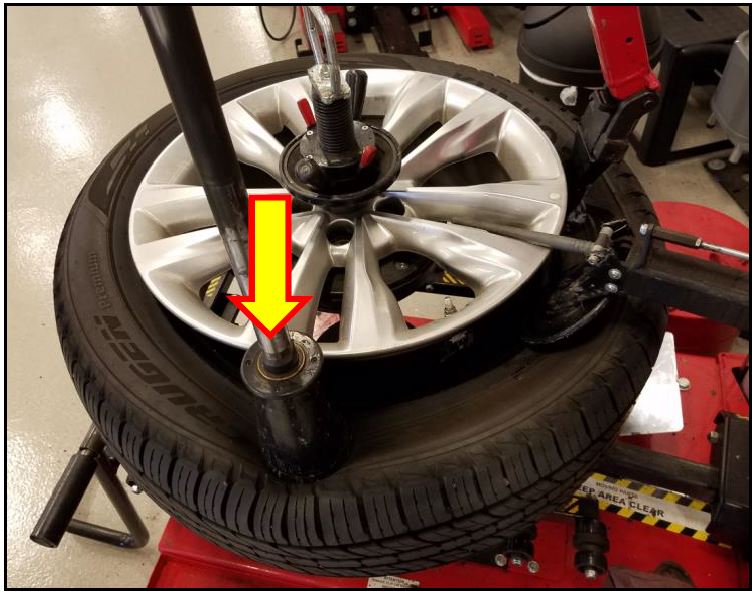
- TPMS sensor should now be easily accessible.
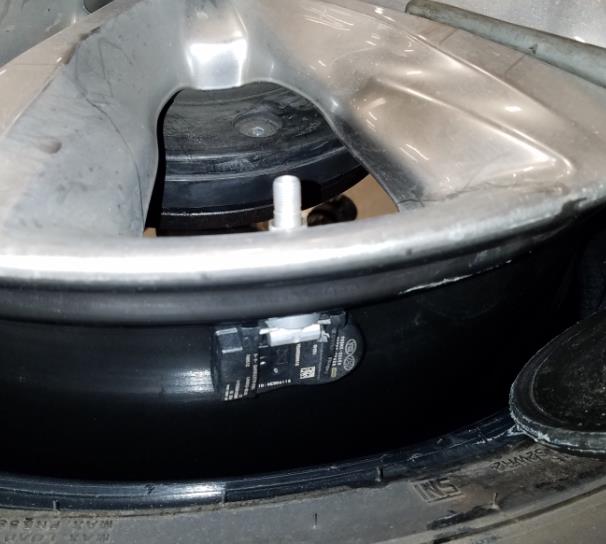
- Remove the TPMS sensor with a deep socket and ratchet.
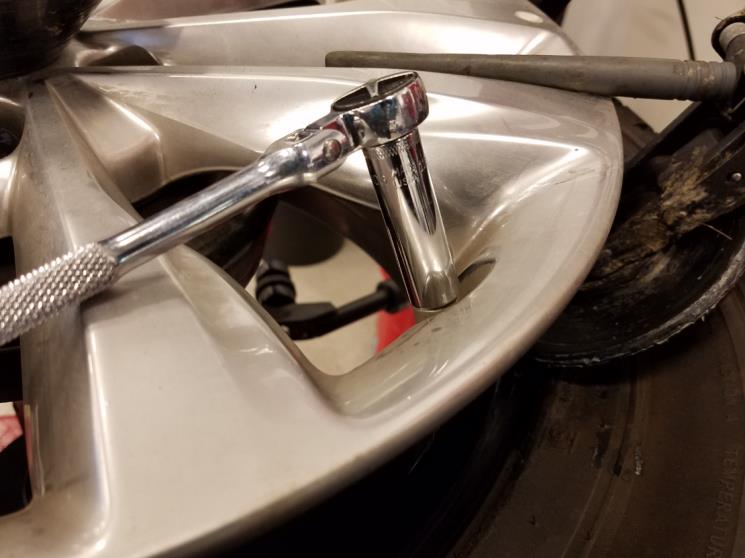
- Install a new TPMS sensor.
Adjust the angle of the valve stem so that the TPMS body makes good contact with the inside rim surface.
Tightening torque:
62~80 lb-inch (7.0~9.0 N.m, 0.7~0.9 kgf.m)
| NOTICE
Always use a new TPMS nut. |
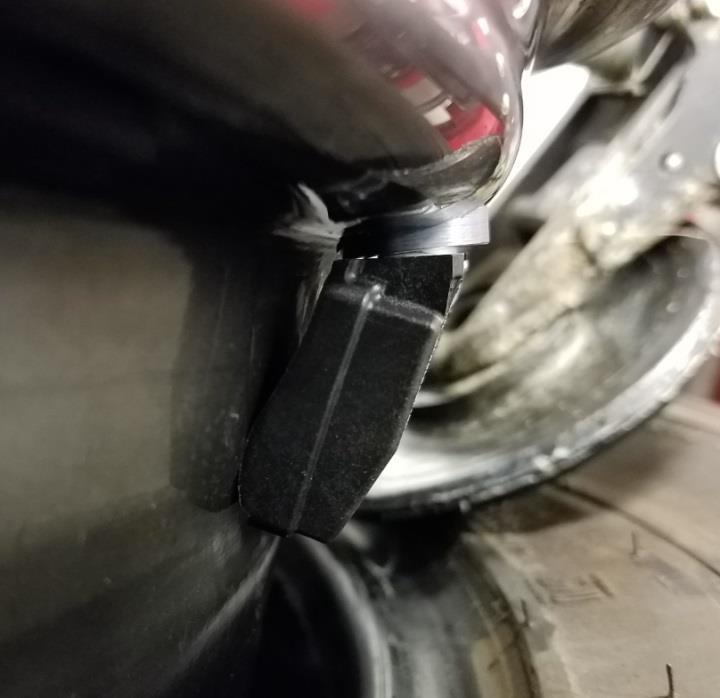
- Remove the valve core from the new TPMS sensor. Reseat the upper bead by applying compressed air into the valve stem.Reinstall the valve core.
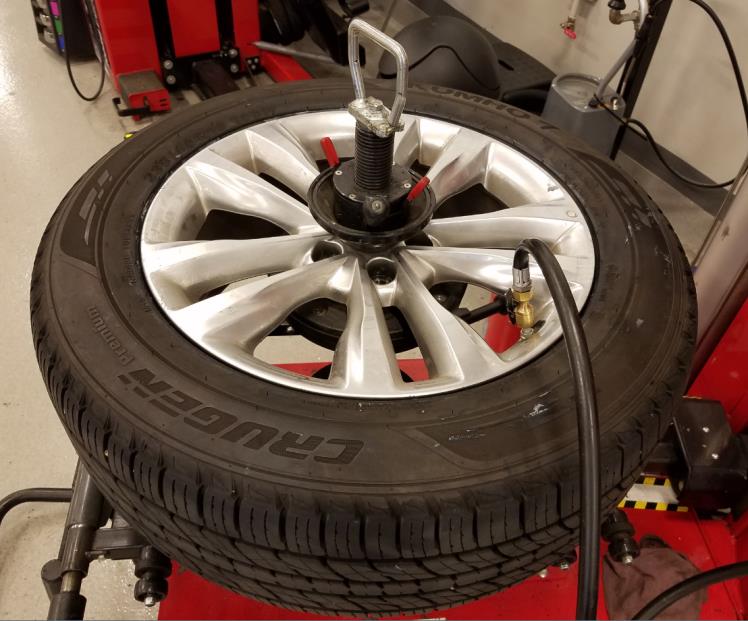
- Verify that the chalk marks made earlier are aligned. If they are not, it is required to reposition the tire on the wheel so they do align.
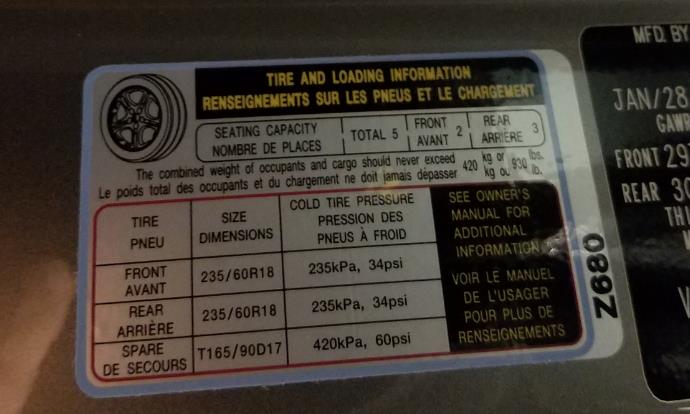
- Set the pressure according to the vehicle’s tire placard label.
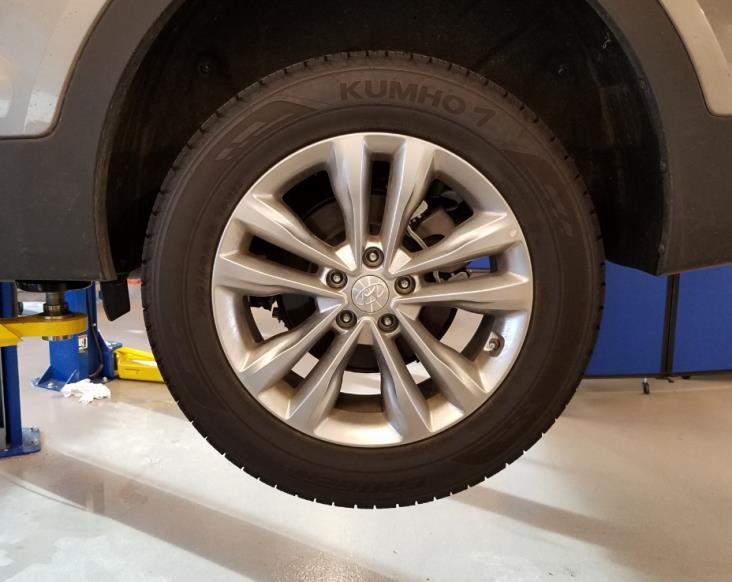
- Mount the wheel/tire assembly back onto the vehicle and torque to spec.
Tightening torque:
65.1~79.6 lb-ft (88.3~107.9 N.m, 9.0~11.0 kgf.m)
- Repeat steps 1-11 for any other required TPMS wheel sensors.
- After replacing wheel sensor(s), perform the
Service Procedure: TPMS Sensor Registration on page 10.
| NOTICE
It is recommended to register all 4 TPMS sensors, regardless of how many sensors were replaced. |
Service Procedure: TPMS Sensor Registration
| NOTICE
This Service Procedure is performed using PC-based GDS, or GDS-mobile. For update information and general precautions, please refer to TSBs #15-GI-001 and #15-GI-002. Ensure the TPMS tool firmware is up to date. GDS procedures shown in this TSB are on GDS Mobile. For questions on PC-based GDS procedures, please call the GIT Helpline at 888-437-0308. It is recommended to register all 4 TPMS sensors, regardless of how many sensors were replaced. |
GDS Mobile Procedure
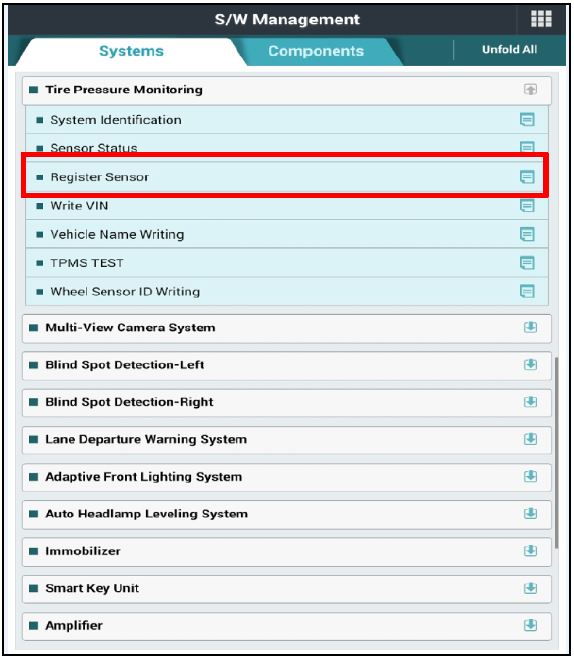
- From the S/W Management screen under Tire Pressure Monitoring, select “Register Sensor.”
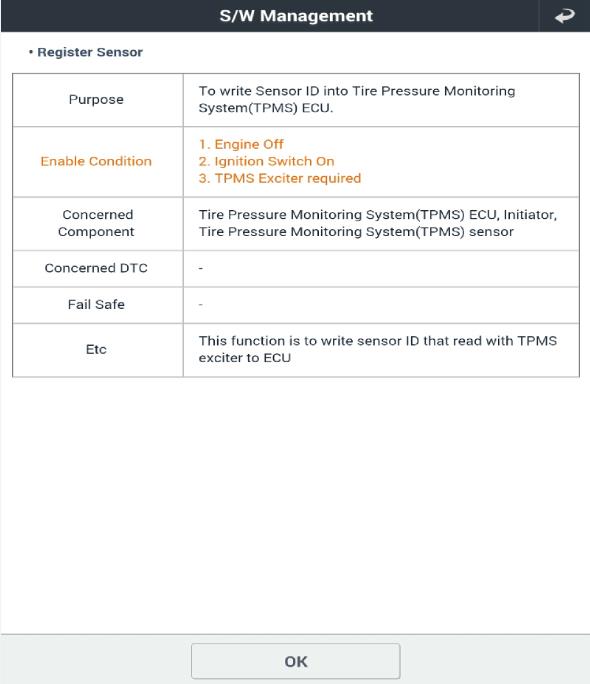
- Read the function summary then click OK.
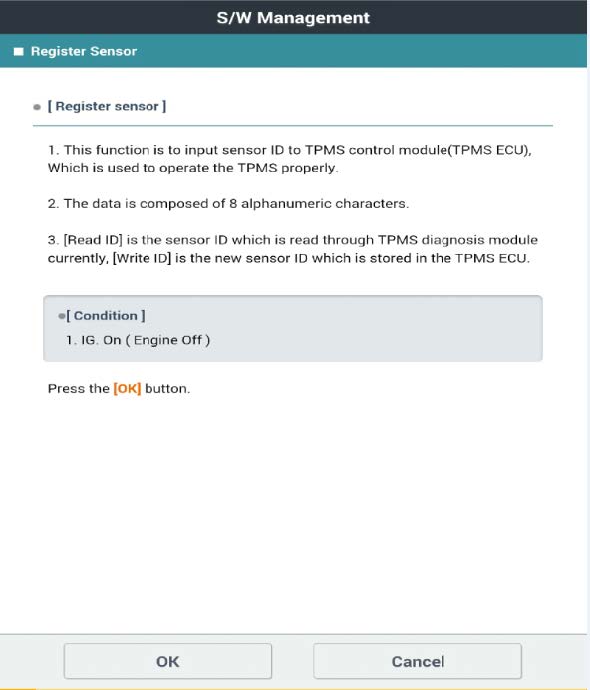
- Read the function description, then click
- Read the service procedure instructions. When ready, place the TPMS tool close to the vehicle’s front left TPMS sensor (no need to press the button on TPMS tool), then select OK on GDS.
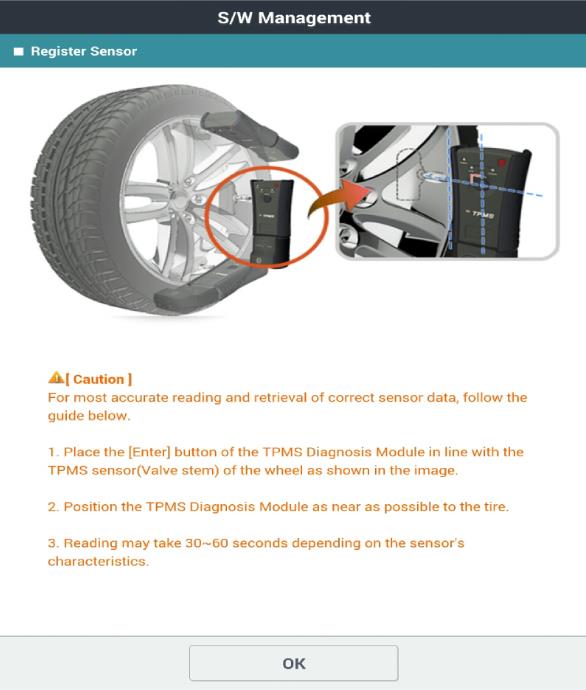
- After the first sensor is read, move to the next sensor (front right). Place the TPMS tool close to the wheel sensor and press the button on the TPMS tool.
- Continue onto the right rear, then left rear sensors, repeating the sensor reading as described in step 5.
- After completing all sensors, the GDS will display ID information from all 4 sensors. Click Write to register these sensors to the TPMS module.
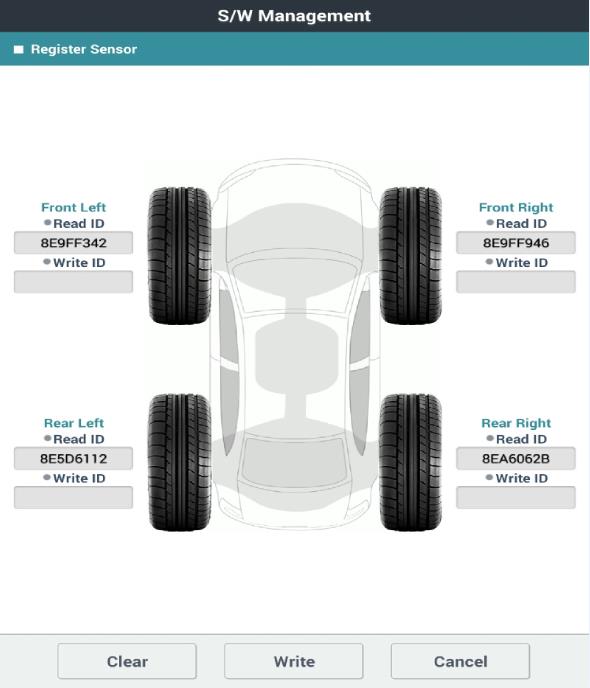
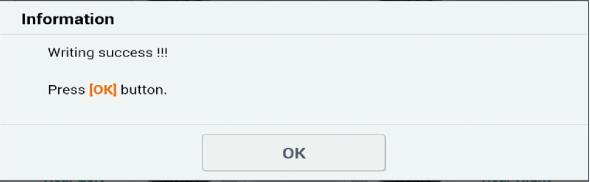
- Click OK to continue.
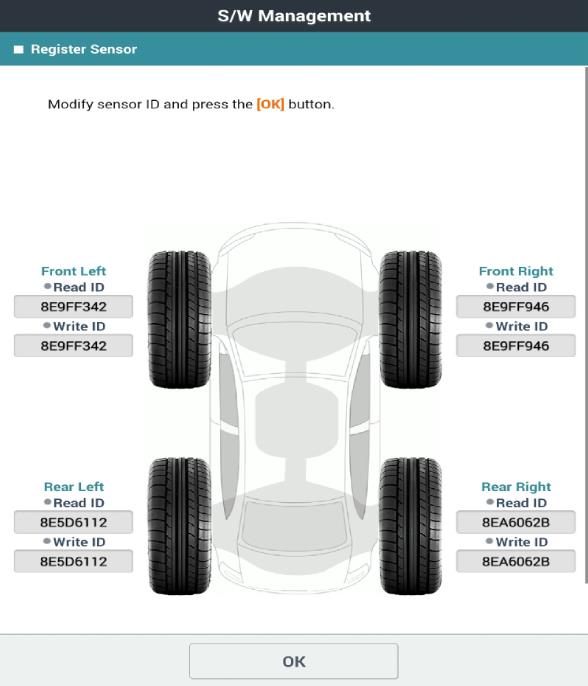
- The written IDs will be displayed as shown. Click OK to continue.
- Set all tires to the placard pressure (cold tires).
- Start engine and confirm no TPMS-related messages are found on the instrument cluster to complete the procedure.
No products found.
No products found.

- Delivers serious jump-starting power with 1000 peak amps and 500 instant starting amps
- Reverse polarity alarm alerts when there is an improper connection; Connect the clamps to the battery, turn on the switch and start your vehicle. All Metal Powder Coated Clamps
- Features a 120 PSI air compressor to help inflate tires with low pressure; High-powered LED light rotates 270 degrees to help you work in the dark
- Built-in 12V DC outlet and USB port provide portable power for electronic devices; Includes a limited 1 year manufacturer warranty
- Jump starter should be charged every 30 days when not in use; Charges using a standard household extension cord (sold separately)
This product presentation was made with AAWP plugin.